Printing images in the size 35×45 mm can seem straightforward at first glance, but achieving a crisp, professional-quality print requires attention to detail, the right tools, and proper understanding of technical specifications. Whether you are preparing passport photos, ID cards, or other official documents, this guide will provide a comprehensive overview of everything you need to know about size 35×45 mm images.
Understanding the Importance of Size 35×45 mm
The size 35×45 mm is a standard measurement for many official documents, particularly in countries where identification and passport photos have strict requirements. It is essential to adhere strictly to this size because any deviation may result in your photo being rejected for official purposes. Not only does this size define the physical dimensions of the print, but it also impacts resolution, aspect ratio, and overall image quality.
When preparing a size 35×45 mm image, understanding the pixel dimensions is equally important. For high-quality prints, an image must maintain sufficient resolution, typically around 300 dpi (dots per inch). This ensures that the final print is sharp and free of pixelation. For a 35×45 mm photo, this roughly translates to 413 x 531 pixels at 300 dpi.
Choosing the Right Camera and Settings
Capturing a high-quality image starts with the camera. Modern smartphones with high-resolution cameras can suffice, but for professional-grade results, a DSLR or mirrorless camera is ideal. When taking a photo for a size 35×45 mm print, follow these tips:
- Use proper lighting to avoid shadows and ensure even illumination.
- Position the subject against a plain background, preferably white or light-colored.
- Ensure the camera is level with the subject’s face to prevent distortion.
- Avoid wide-angle lenses that can exaggerate facial features; a standard lens is recommended.
Proper attention to camera settings is crucial. Set the ISO to a low value to reduce noise, use an aperture that keeps the face fully in focus, and maintain a shutter speed that prevents blur. The goal is to capture a clean, sharp image that will look professional when printed at size 35×45 mm.
Preparing the Image for Printing
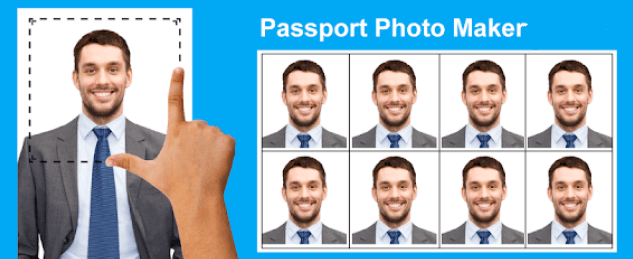
Once the photograph is taken, the next step is editing and formatting. Digital editing tools such as Adobe Photoshop, GIMP, or online editors can help you resize the image accurately. To ensure the image meets size 35×45 mm specifications, follow these steps:
- Open the image in your editing software.
- Set the image canvas size to 35×45 mm, ensuring the resolution is 300 dpi.
- Crop the image to focus on the subject’s face, maintaining proper head and shoulder proportions.
- Adjust brightness, contrast, and color balance to produce a natural look.
It is important to avoid excessive editing or filters, especially for official documents, as authorities usually require a natural, unaltered appearance.
Printing Options for Size 35×45 mm
Printing a size 35×45 mm image can be done at home or through professional printing services. Each method has its advantages and challenges.
Home Printing
If you choose to print at home, you will need a high-resolution printer capable of producing photo-quality prints. Follow these tips:
- Use photo paper designed for inkjet or laser printers.
- Set the printer settings to the highest quality mode.
- Ensure the paper size matches the intended print layout to avoid scaling issues.
- Use a cutting tool or precision scissors to trim the printed image to exactly 35×45 mm.
Professional Printing Services
Professional photo labs offer precision printing for size 35×45 mm images. The advantages include consistent quality, accurate color reproduction, and guaranteed dimensions. When using a professional service, provide the digital file in the correct format, such as JPEG or PNG, with the required resolution. Many labs also offer packages specifically for passport or ID photos in size 35×45 mm.
Common Mistakes to Avoid
When printing size 35×45 mm images, several common mistakes can compromise quality or acceptance. Avoid these pitfalls:
- Printing at low resolution, which results in pixelated images.
- Cropping incorrectly, leading to improper head-to-body proportions.
- Using incorrect background colors or patterns, which may be rejected for official documents.
- Failing to check print dimensions, causing images to be slightly larger or smaller than 35×45 mm.
Being meticulous during each step ensures that your size 35×45 mm image is acceptable and visually appealing.
Maintaining Consistency Across Multiple Prints
If multiple copies of a size 35×45 mm image are required, consistency is key. Using the same digital file for all prints prevents variations in color, exposure, or cropping. For official purposes, it is often recommended to produce all images in a single printing session or at the same professional lab to maintain uniformity.
Digital Submission Considerations
In today’s digital age, many official processes allow or require submission of a digital size 35×45 mm image. Even in digital form, the same standards of size, resolution, and quality apply. Some online forms will automatically resize images, but it is best to upload a correctly sized file to avoid distortion. Check the submission guidelines to ensure compliance with resolution, file format, and background requirements.
Storage and Handling of Printed Photos
Once printed, size 35×45 mm images must be handled carefully to maintain quality. Store them in a cool, dry place away from direct sunlight to prevent fading. Avoid bending or folding the photos, and consider using protective sleeves or envelopes if they need to be transported. Proper storage ensures that your images remain sharp and professional-looking over time.
Conclusion
Printing size 35×45 mm images is a task that requires precision, attention to detail, and the right tools. From capturing a high-quality photograph to editing, formatting, and printing, each step plays a crucial role in achieving a professional result. By following best practices for lighting, camera settings, image preparation, and printing, you can ensure that your size 35×45 mm images meet official standards and maintain excellent visual quality. Whether for passport photos, ID cards, or other official purposes, understanding the technical requirements and avoiding common mistakes will make the entire process smoother and more reliable.
Properly executed, your size 35×45 mm images will not only comply with regulations but also present a polished, professional appearance that is suitable for any official documentation.